|


All trademarks and registered trademarks used herein are the
property of their respective owners. Reproduction in whole or in part in any
form or medium without express written permission by
Anycpu.com is
prohibited.
|
|
Part number: 90-M8L841-EOUAY
Software | Downloads |
Installation | Bios Setup
|
Introduction
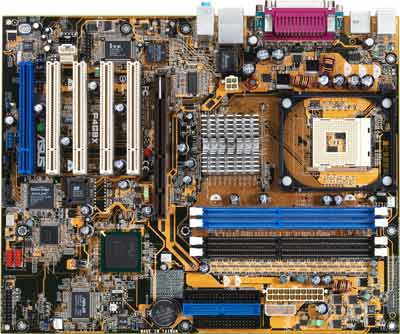
The P4G8X Deluxe, leveraging Intel®'s latest E7205 chipset,
supports Intel®'s
Hyper-Threading Technology and
processing power of 3.06GHz and beyond to bridge you to a new dimension of
computing experience. With dual-channel DDR up to 4GB, the
P4G8X Deluxe provides the
bandwidth for the most memory-intensive applications. The ASUS motherboard,
of course, also throws in industry-leading technologies such as AGP 8X,
Serial ATA and Broadcom Gigabit LAN for revolutionary performance. |
|
3GHz+
CPU and Intel® Hyper-Threading Technology support
Leveraging the Intel® E7205 chipset to support 3GHz+ P4 CPUs on
533MHz FSB, DDR memory,
Intel Hyper-Threading Technology
and a full-range of advanced features, the P4G8X Deluxe delivers a
full-value, high-performance solution for today's most demanding tasks. |
|
Gigabit
LAN (optional)
The P4G8X Deluxe with BroadCom Gigabit LAN, delivers transfer speeds up to
ten times faster than conventional 10/100 Ethernet connections. Gigabit LAN
is the networking standard for the future and is ideal for handling large
amounts of data such as video, audio, and voice. |
|
Dual-Channel
DDR
Dual-channel DDR technology doubles the bandwidth of your system memory and
hence boost the system performance to out perform any memory existing
solutions in the market. The P4G8X Deluxe allows you to handle
memory-intensive tasks with ease. |
|
IEEE 1394 interface
(optional)
IEEE 1394
interface provides high speed digital interface for audio / video appliances
such as digital television, digital video camcorders, storage peripherals &
other PC portable devices. |
|
C.P.R.
(CPU Parameter Recall)
When the system
hangs due to overclocking failure, there is no need to open the case to
clear CMOS data. Simply restart the system and the BIOS will automatically
restore the CPU default setting for each parameter. |
|
Serial
ATA technology (optional)
Serial ATA is the
next generation ATA specification that provides scalable performance for
today and tomorrow. With up to 150MB/s data transfer rate, Serial ATA is
faster than current Parallel ATA, while providing 100% software
compatibility. |
|
AGP
8X Technology
AGP8X (AGP 3.0) is
the next generation VGA interface specification that enables enhanced
graphics performance with high bandwidth speeds up to 2.12GB/s. With a bus
of 533MHz, AGP8X is twice as fast as AGP4X. |
|
Multi-language
BIOS
ASUS provides
friendly localized BIOS setup menu to help you configure your system as easy
as possible.
** For multi-language BIOS, please visit the ASUS website for supported
languages information. |
|
Q-Fan
Technology
ASUS Q-Fan
technology intelligently adjusts fan speeds according to system loading to
ensure quiet, cool and efficient operation. |
|
ASUS®
EZ Flash
With ASUS EZ Flash, you can update BIOS before entering operating system. No
more DOS-based flash utility and bootable diskette required. |
|
ASUS
POST Reporter
During the
computer POST (Power On Self-Test), ASUS POST Reporter provides friendly
voice warnings through internal or external speaker, clearly explaining
system errors for quick and easy optimization. The bundled Winbond Voice
Editor software allows uses to add customized system voice warnings and
multi-language support. |
|
Extreme
Overclocking
ASUS P4G8X Deluxe
offers robust overclocking options to maximize your system performance.
Flexible CPU Core Voltage
Adjustments in 0.025V increments over defaults
SFS (Stepless Frequency
Selection) from 100Mhz up to 200MHz at 1MHz increments
Fixed AGP/PCI frequencies
ASUS
proprietary C.P.R. (CPU Parameter Recall) |
|
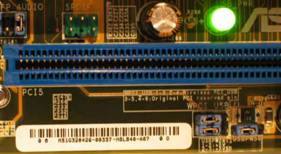
AGP
Warning LED
ASUS has designed
into this motherboard an AGP Warning LED. The AGP Warning LED automatically
stops you from turning on your system with incompatible voltage AGP (3.3V)
cards, and protects from permanently damaging your motherboard. |
|
ASUS
EZ Plug™
The ASUS EZ Plug
power connector lets you use your existing power supply and eliminates the
need to buy a special ATX 12V power supply to support your Pentium 4 CPU. |
|
AGP
Warning LED
ASUS has designed
into this motherboard an AGP Warning LED. The AGP Warning LED automatically
stops you from turning on your system with incompatible voltage AGP (3.3V)
cards, and protects from permanently damaging your motherboard. |
|
ASUS
Reliability
All ASUS
motherboards are designed and tested to meet the highest quality standards.
Responsive customer support and frequent BIOS and driver updates ensure that
you're getting the fastest, most reliable performance - all the time. All
ASUS motherboards are also backed by a 3-year limited warranty. |
|
Comprehensive
Software Bundle
All ASUS
motherboards include a valuable software bundle of popular third party
programs that enable you to enjoy the full capabilities of your ASUS
product:
Trend® Micro PC-cillin 2002
anti-virus program
InterVideo® WinCinema bundled
(Gold version only)
ASUS® PC
Probe for system monitoring |
|
CPU
Socket 478 for Intel® Pentium® 4 / Celeron up to
3.06GHz+
On-die 512KB/256KB L2 Cache with full speed
Intel® Hyper-Threading Technology
ready
New power design supports up to 3.06GHz CPU speeds and above
Chipset
Intel® E7205 Memory Controller Hub
Intel® 82801DB ICH4
Front
Side Bus
533 / 400 MHz
Memory
Dual channel memory architecture
4 x 184-pin DIMM Sockets support max. 4GB PC2100/PC1600 ECC/non-ECC DDR
SDRAM memory
Expansion
Slots
1 x AGP Pro/8X (1.5V only)
5 x PCI (one ASUS BlueMagic PCI Slot)
IDE
2 x UltraDMA 100 / 66 / 33
Serial
ATA (optional)
Silicon Image 3112A controller supports two Serial ATA ports
RAID
(optional)
RAID 0 or RAID 1 support by two Serial ATA connectors
Audio
(optional)
Realtek ALC650 6-channel CODEC
LAN
(optional)
BROADCOM® 1000 Mbps Ethernet Controller
1394
(optional)
TI® TSB43AB22 controller
2 x 1394 port
Special
Features
Power Loss Restart
ASUS® JumperFree
CrashFree BIOS
ASUS® MyLogo2
Support S/PDIF in/out interface
ASUS® Post Reporter
ASUS® EZ Plug
ASUS® Q-Fan technology
ASUS® EZ Flash
Multi-language BIOS
AGP warning LED
Overclocking
Features
CPU and AGP voltage adjustable
ASUS JumperFree
C.P.R. (CPU Parameter Recall)
SFS (Stepless Frequency Selection) from 100MHz up to 400MHz at 1MHz
increments
Fixed AGP/PCI frequencies
Back
Panel I/O Ports
|
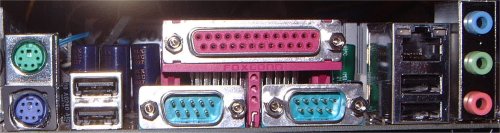
1 x Parallel
2 x Serial
1 x PS/2 Keyboard
1 x PS/2 Mouse
1 x Audio I/O
4 x USB 2.0 / 1.1
1 x RJ45 port |
 |
Internal
I/O Connectors
1 x USB 2.0 connector support additional 2 USB 2.0 ports
CPU / Power / Chassis FAN connectors
20 pin ATX Power connector
4 pin ATX 12V Power connector
IDE LED connector, power LED connector
Chassis Intrusion
S/PDIF in/out connector
CD / AUX / Modem audio in
Front Audio Panel connector
GAME/MIDI connector
2 x IEEE1394 port
BIOS
4Mb Flash ROM, Award® BIOS, TCAV, PnP, DMI2.0, WfM2.0, SM BIOS
2.3, Multi-language BIOS, ASUS EZ Flash, ASUS MyLogo2, CrashFree BIOS, C.P.R
Industrial
Standard
PCI 2.2, USB 2.0
Manageability
WfM 2.0, DMI 2.0, WOL by PME, WOR by PME, Chassis Intrusion, SM Bus
Support
CD
Drivers
ASUS PC Probe
Trend Micro&153 PC-cillin 2002 anti-virus software
ASUS LiveUpdate Utility
Accessories
|
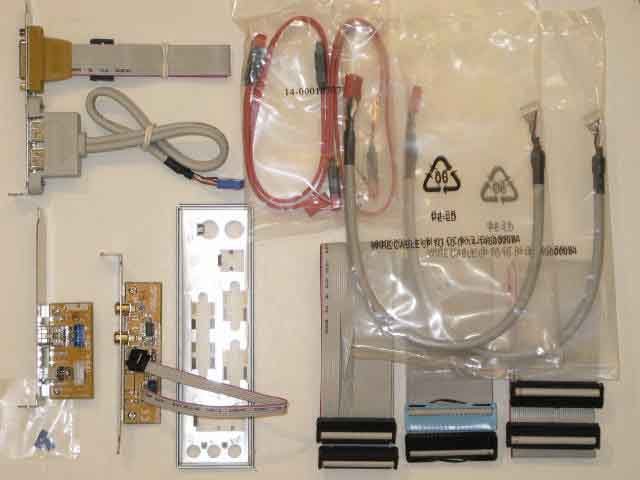
User's manual
UltraDMA cable
IDE cable
FDD cable
2-port USB 2.0 / Game port module
S/PDIF in/out module
I/O shield
2 x Serial ATA cable
2 port IEEE1394 module
InterVideo WinCinema |

|
Form
Factor
ATX Form Factor 12" x 9.6" (30.5cm x 24.5cm) |
- Drivers (on CD)
- Audio - ALC650 Avance/Realtek AC'97 Drivers Windows
98SE/ME/2000/XP WDM Driver V5.10.0.3990 and Applications V3.29
- SATA - Silicon Image Serial ATA driver V1.0.0.22 and Silicon Image
Serial ATA Utility V1.0.0.14
- Chipset - Intel Application Accelerator V2.2.2 Production Version
and Chipset Software Installation Utility V4.10.1012
- LAN - Broadcom NetXtreme Gigabit Ethernet Software for
the BCM5702 NetXtreme Gigabit Ethernet Adapter release
5.5.8
- Specialized Mobile Radio - ITE GSM Editor V1.50D
- USB - USB 2.0 Driver for Windows XP
- ASUS PC Probe V2.19.00 for
Windows 95/98/NT40/ME/2000/XP (on CD) –
Monitors CPU, voltages, fan speed
- ASUS Aflash V2.20 (on CD) – BIOS flash utility
- ASUS Update V3.41.03 (on CD) – BIOS information, download and
update
- ASUS Hotkey V1.0.2 for Windows 95/98/ME/NT40/2000/XP - execute
programs and actions for iPanel buttons or keyboard key combinations.
- ASUS Screen Saver (on CD)
-
Winbond Voice Editor Vedit – for POST voice feedback WAV files
-
PC-cillin 2002 (on CD) – Anti-virus application
- Lightsurf 3Deep (on CD) - corrects lighting, shading and color for 2D and 3D
games
- Default Logo Bitmaps (on CD) – 256 colors
-
InterVideo WinCinema (OEM version M295B)
– WinDVD software supporting 5.1 channel
audio, WinRip MP3 player, encoder, ripper, WinCoder real-time MPEG-1 & 2 software video encoder, WinProducer MPEG 1 & 2
video editing software
From ASUS
|
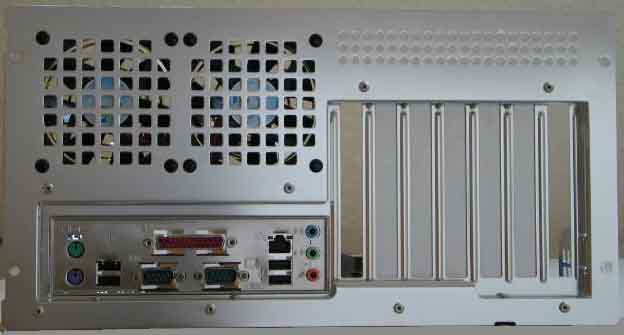
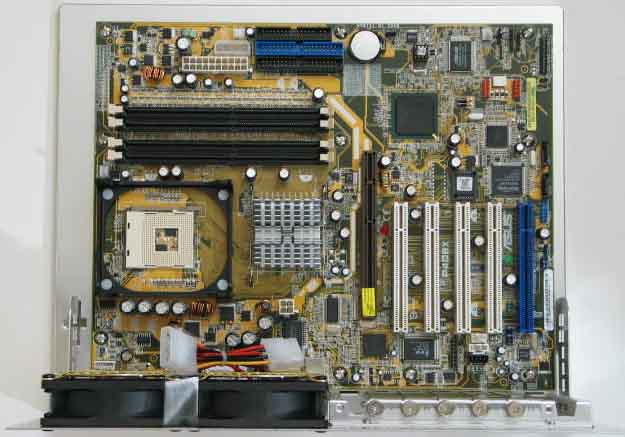
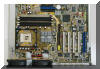
Installed board onto main board tray using ten
spacers and screws. The back connector bezel that came with the case did not
have the right break-outs for the P4G8X Deluxe board – replaced bezel with
the one supplied with the main board.
 |
 |
P4G8X BIOS version 1003 was installed out of the box.
7/12/03: Updated BIOS to version 1006 using ASUS
LiveUpdate. CMOS was cleared. Entered settings as per
BIOS Setup section.
Initially, clear the CMOS RAM using the CLRTC jumper.
When flashing to a different BIOS version, it is recommended to clear the CMOS
RAM also. Then reenter the desired settings.
Press
Delete key during POST to enter the BIOS setup program.
These settings were changed from the factory defaults:
- Main
- Set the system time
- Set the system date
- Advanced
- CPU Speed: set to <3066> from <Manual>. See
CPU Overclocking section.
- AGP voltage: set to <1.6V> from <1.5V> (supposed to
prevent crashes related to 9700 Pro graphics card. Without this, the board
sometimes would not reboot. Have not tried default voltage since 9800 Pro
was installed.)
- USB Legacy Support: set to Enabled from Auto (for USB
keyboard/mouse support during power-on)
- Chip Configuration - see
Memory Timings section.
- Graphics aperture size: set to <64 MB>.
- AGP capability: set to <8X Mode> from <4X Mode>
- Video memory cache mode: set to <USWC>
from <UC>
- I/O Device Configuration
- Onboard AC97 Audio Controller: set to <Disabled>
from <Auto>
- Onboard Game Port: set to <Disabled> from
<200H-207H>
- Onboard Midi I/O: set to <Disabled> from <330H-331H>
- PCI Configuration
- PCI Latency Timer: set to <64>
from <32>
- Primary VGA BIOS: set to <AGP VGA Card> from <PCI
VGA Card>
- Onboard ATA Device: set to <Disabled> from <Enabled>
(this disables the SATA controller). When the two SATA HDDs were added,
set to <Enabled>.
- Power
- Power Management: set to <Disabled> from <User-Defined>
- ACPI Suspend To RAM: set to <Enabled> from <Disabled>
(for stand-by, power state S3)
- PWR Button < 4 seconds: set to <Suspend> from <Soft Off>
- Power Up Control
- Power Up On PCI Device: set to <Enabled> (for
Wake On LAN and
Wake On Modem)
- Hardware Monitor
- Power Temperature:
set to <Ignore>
- Power Fan Speed: set to <Ignore> (unless fan with
speed signal is connected)
- Case Fan Speed: set to <Ignore> (unless fan with
speed signal is connected)
- CPU Fan Speed: set to <Ignore> (unless fan with
speed signal is connected)
- Q-Fan Control: set to <Enabled> from <Disabled>
- Fan Speed Ratio: set to 10/15
- Speed Up/Down Response Time: set to <16sec/32sec>
from <64sec/128sec>
- Boot
- Make the CD-ROM the second device in boot sequence,
disable booting from floppy or network (1-Disabled,
2-CD-ROM, 3-Hard disk, 4-Disabled)
- Plug & Play O/S:
set to <No>
- Boot Virus Detection: set to <Enabled> from <Disabled>
- Boot Up Floppy Seek: set to <Disabled> from <Enabled>
Notes
[1] With the increase of on-board graphics
memory this option has lost its relevance. The original recommendations were
to set the AGP aperture to about ½ of the total system memory. A good
approximation now would be: Total system memory / (video memory [MB] /2).
For this system that value is 32 MB. See
LostCircuits.
Some applications and games are still using the former calculation and issue
a warning if the AGP aperture is low. Therefore this field was set to 64MB.
[2] USWC is an acronym for "Uncacheable,
Speculative Write Combining", and means "will make video go faster if your
card supports it". Enabling USWC allows several small writes to be buffered
up and sent to AGP as one write. Since graphics data tends to have very
strong locality, this increases the throughput of the bus and unloads the
processor to some extent. But it also increases the latency of the small
writes and can cause slowdowns when the writes are more random... as always
it's a tradeoff that must be made based on benchmarking your typical
workloads. This extra latency that you get when enabling USWC can work for
you on a high overclock by allowing the AGP card more time between writes.
[3] Disabled after installation of the Audigy 2
sound card.
[6] In simple terms, PCI latency timer is a
setting that instructs the system how long a given PCI device is allowed to
hold onto the PCI bus before allowing another device to poll and run its
operation. The benefit of a higher PCI Latency setting is that hard drive
performance improves noticeably. This is especially true for RAID or PCI ATA
controllers; but can also apply to regular IDE hard drives. The downside of
a super high PCI Latency setting is that some of your other PCI cards
(especially sound cards) might not like it. Also a downside with a super
high setting, is that devices have to sit and wait their turn longer to
execute operations and some people say they can "feel" this latency
(internet surfing that seems to have pause points is one example). A
setting of 64 is actually rather conservative, but it can give your system a
little extra pep. Plus 64 is a safe setting for installing Windows. If you
want to play with this setting and see if it gives you better HDD or system
performance, here is my rule of thumb. Start at 64 and slowly move up in
increments of 10 saving and rebooting in between. Keep gong as high as you
can until you begin to notice choppy, popping, or missing sound from your
sound card. Then back this setting down a notch or two.
[7] New for BIOS version 1006
[8] Set to <Legacy Floppy> when booting from a
floppy disk, otherwise set to <Disabled>
[9] As per
recommendations for Windows XP
[10]
ACPI Power
States:
- S0 – Active, with all power on.
- S1 – Standby, with display and drives
powered off, but power maintained for CPU, memory and fans.
- S2 – Standby, with CPU and cache power
off.
- S3 – Standby, with only minimal power
maintained to RAM for a fast startup. This is useful for desktops because it
keeps your PC ready to use, but eliminates noise from fans and disk drives.
- S4 – Hibernate with all power off and
the image of your desktop saved to disk.
- S5 – Complete power off with all files
closed and no image saved to disk.
|


![[Box]](_Main%20Board_files/image002.jpg)